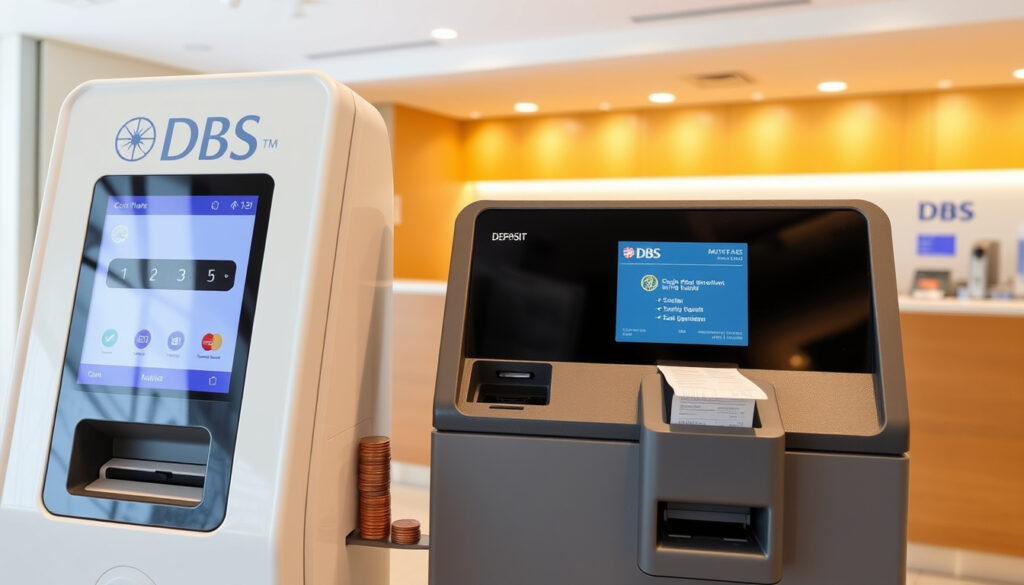
DBS Coin Deposit Machine: Fees, Locations, and How to Use
You’ve probably got a jar of loose change sitting somewhere. Instead of hauling it to a bank counter and paying a fee, DBS coin deposit machines let you dump in mixed coins for free — as long as you use the self-service machine. The branch counter, on the other hand, charges $1.80 per 100 coins. This guide gives you the fees, step-by-step instructions, and tips to avoid unnecessary costs.
DBS coin deposit fee (branch counter): $1.80 per 100 coins (self-service free) ·
Coin deposit machine locations in Singapore: Over 30 DBS/POSB branches islandwide ·
Operating hours: 24/7 at most machines ·
Maximum coin weight per deposit: 5 kg ·
Deposit limit per transaction: Up to 1,000 coins
Quick snapshot
- Self-service machines: $0 fee (DBS Singapore – Deposit Coins)
- Branch counter: $1.80 per 100 coins (DBS Singapore – Deposit Coins)
- Machine location list available on DBS website (DBS Singapore – Deposit Coins)
- Insert coins (mixed denominations of Singapore dollars) (DBS Singapore – Deposit Coins)
- Maximum 5 kg or 1,000 coins per transaction (DBS Singapore – Deposit Coins)
- Funds credited instantly to your DBS/POSB account (DBS Singapore – Deposit Coins)
- 30+ DBS/POSB branches islandwide (DBS Singapore – Self-Service Banking)
- 24/7 access at most locations (DBS Singapore – Deposit Coins)
- Check online for nearest machine (DBS Singapore – Deposit Coins)
- Machine full or jammed (Scribd-hosted DBS/POSB Coin Deposit Machine Guide)
- Counter fee if not using machine (DBS Singapore – Deposit Coins)
- Weight or coin count limit reached (DBS Singapore – Deposit Coins)
Seven specifications, one pattern: self-service machines cost nothing and handle mixed coins instantly.
| Specification | Value |
|---|---|
| Fee (self-service machine) | $0 |
| Fee (branch counter) | $1.80 per 100 coins (DBS Singapore – Deposit Coins) |
| Maximum weight per deposit | 5 kg (DBS Singapore – Deposit Coins) |
| Maximum coins per deposit | 1,000 (DBS Singapore – Deposit Coins) |
| Operating hours | 24/7 (most machines) (DBS Singapore – Deposit Coins) |
| Denominations accepted | All Singapore coin denominations (mixed OK) (DBS Singapore – Deposit Coins) |
| Transfer time | Instant to DBS/POSB account (DBS Singapore – Deposit Coins) |
How much does DBS charge for coin deposit?
Fee structure for DBS coin deposit machines
- Self-service machine: $0 fee (DBS Singapore – Deposit Coins)
- Branch counter deposit: $1.80 per 100 coins or part thereof (DBS Singapore – Deposit Coins)
- Example: depositing 105 coins at the counter costs $3.60 (DBS Singapore – Deposit Coins)
The implication: if you’re depositing more than a handful of coins, the machine saves you real money.
When is the $2 fee applied?
Some older references mention a $2 fee, but DBS’s current official page states the branch fee is $1.80 per 100 coins (DBS Singapore – Deposit Coins). The $2 figure may refer to a per-transaction charge for credited amounts that existed previously or for specific account types. The fee applies only when you deposit coins at a branch counter during designated hours (Tuesdays and Thursdays, 8.30 am to 11.30 am) (DBS Singapore – Deposit Coins). Self-service machines have no fee.
How to deposit coins without paying a fee
- Use a DBS/POSB coin deposit machine – free and available 24/7 (DBS Singapore – Deposit Coins)
- Branch counter deposits incur the $1.80 per 100 coins fee, with no waiver for most accounts (DBS Singapore – Deposit Coins)
- Exceptions: POSB Child Development Account deposits are automatically waived (DBS Singapore – Deposit Coins); POSBkids fee waiver applies until the child turns 16 (DBS Singapore – Deposit Coins)
For a typical jar of loose change (say 500 coins), using the machine saves you $9 compared to the branch counter rate of $1.80 per 100 coins. Over a year, that’s pocket money worth keeping.
Where can I deposit coins in Singapore for free?
DBS coin deposit machine locations list
- Over 30 DBS/POSB branches across Singapore (DBS Singapore – Self-Service Banking)
- Use the DBS branch locator tool to find the nearest machine (DBS Singapore – Deposit Coins)
- Most machines are accessible 24/7 (DBS Singapore – Deposit Coins)
Other free coin deposit options in Singapore
- POSB coin deposit machines (same network as DBS) are available at selected POSB branches (DBS Singapore – Deposit Coins)
- OCBC also offers coin deposit machines, but only for OCBC account holders – and fees may apply after a certain volume (Scribd-hosted DBS/POSB Coin Deposit Machine Guide)
The catch: machine availability varies, so always check the locator before heading out.
How to use a DBS coin deposit machine?
Step-by-step guide for coin deposit
- Find a machine. Use the DBS locator tool to identify the nearest DBS or POSB branch with a coin deposit machine (DBS Singapore – Deposit Coins).
- Bring your card. You need a DBS or POSB ATM card or your account number – the machine deposits only to a DBS/POSB account (DBS Singapore – Deposit Coins).
- Insert coins. Pour your loose change – mixed denominations of Singapore dollars (1¢, 5¢, 10¢, 20¢, 50¢, $1) are accepted, both Floral Series and National Icon/Landmark Series (DBS Singapore – Deposit Coins).
- Confirm the amount. The machine counts and displays the total. Verify and accept (Scribd-hosted DBS/POSB Coin Deposit Machine Guide).
- Funds credited. The amount is instantly added to your DBS/POSB account (DBS Singapore – Deposit Coins).
What to do if machine is full or broken
- Try a nearby branch – the locator shows real-time machine status (if available) (DBS Singapore – Deposit Coins).
- Report the issue to DBS customer service.
- As a backup, deposit at the branch counter – but be prepared for the $1.80 per 100 coins fee (DBS Singapore – Deposit Coins).
Tips for smooth deposit
- Do not exceed 5 kg or 1,000 coins per transaction (DBS Singapore – Deposit Coins).
- Remove foreign objects (paper clips, rubber bands) that could jam the machine.
- If you have more coins, split into multiple transactions.
Can I avoid coin deposit fees?
Fee comparison: self-service vs branch counter
- Self-service machine: $0 fee, instant credit, 24/7 access (DBS Singapore – Deposit Coins)
- Branch counter: $1.80 per 100 coins, limited to Tuesdays and Thursdays 8:30–11:30 am, requires coins sorted by denomination (DBS Singapore – Deposit Coins)
The trade-off: branch counter may be the only option if no machine is nearby, but it’s costly and inconvenient.
When the $2 fee applies
As noted, the $1.80 per 100 coins fee applies to all branch counter coin deposits for most account types. MyAccount, POSBkids, and POSB Child Development Account deposits are not waived (except CDD and POSBkids until age 16) (DBS Singapore – Deposit Coins). There is no $2 flat fee in the current published fee schedule.
Alternatives to avoid fees
- Use the self-service machine – it’s free.
- Deposit at a POSB branch if that is more convenient (same fee structure).
- Consider using coin counting services at supermarkets (may charge a percentage).
If you have a DBS or POSB account, the self-service coin deposit machine is your best bet. The branch counter is only worth it if the machine is down and you have a small number of coins.
DBS Coin Deposit Machine Specifications
Six specs that matter for users: weight, coin count, denominations, and fee structure.
| Specification | Value | Source |
|---|---|---|
| Coin weight limit per transaction | 5 kg | DBS Singapore – Deposit Coins |
| Coin count limit per transaction | 1,000 coins | DBS Singapore – Deposit Coins |
| Accepted denominations | 1¢, 5¢, 10¢, 20¢, 50¢, $1 (Singapore) | DBS Singapore – Deposit Coins |
| Accepted coin series | Floral Series, National Icon/Landmark Series | DBS Singapore – Deposit Coins |
| Operating hours | 24/7 (most machines) | DBS Singapore – Deposit Coins |
| Credit time | Instant to DBS/POSB account | DBS Singapore – Deposit Coins |
Upsides
- Free to use at self-service machines
- Accepts mixed denominations
- Instant credit to your account
- 24/7 availability at most locations
Downsides
- 5 kg or 1,000 coin limit per transaction
- Machine may be full or out of service
- Only works with DBS/POSB accounts
- Branch counter deposits are costly ($1.80 per 100 coins)
Confirmed facts
- DBS self-service coin deposit machines are free to use (DBS Singapore – Deposit Coins).
- Branch counter coin deposit costs $1.80 per 100 coins (DBS Singapore – Deposit Coins).
- Maximum weight per deposit is 5 kg (DBS Singapore – Deposit Coins).
- Maximum coin count per deposit is 1,000 (DBS Singapore – Deposit Coins).
- Coins must be Singapore dollars (1¢ to $1) (DBS Singapore – Deposit Coins).
- Deposit is credited instantly to your DBS/POSB account (DBS Singapore – Deposit Coins).
- POSB Child Development Account deposits are automatically fee-waived (DBS Singapore – Deposit Coins).
What’s unclear
- The exact list of all machine locations may change – subject to branch availability (DBS Singapore – Deposit Coins).
- Whether non-DBS customers can use the machines (machines likely require DBS/POSB account for crediting).
- Reportedly, the machine fee was previously $0.012 per coin, but current policy states free (Scribd-hosted DBS/POSB Coin Deposit Machine Guide).
Perspectives on DBS coin deposit machines
“Deposit coins into a DBS/POSB Account instantly via our upgraded Coin Deposit Machines. Coin deposit fees are waived when using the Coin Deposit Machine.”
— DBS Support Page (DBS Singapore – Deposit Coins)
“On the DBS website it says ‘coin deposit fees are WAIVED when using the Coin Deposit Machine.’ So I think the $2 only applies at the counter.”
— Reddit user (community forum, 2023)
“Coin Deposit Services – Certis provides coin deposit machines for banks including DBS.”
— Certis (coin deposit service provider)
For the typical Singaporean with a DBS or POSB account, the self-service coin deposit machine offers the only truly free and convenient way to clear loose change. The trade-off is the 5 kg/1,000 coin cap per transaction – anyone with a large coin collection may need multiple trips or accept the branch counter fee. For that specific group, the choice is clear: split your coins into batches and stick to the machine, or pay $1.80 per 100 coins at the counter.
lemon8-app.com, singsaver.com.sg, facebook.com, blog.seedly.sg
Frequently asked questions
Can I deposit coins using a DBS ATM?
No, DBS ATMs accept only notes and cheques. Coin deposits require either a self-service Coin Deposit Machine or a branch counter deposit.
What happens if the coin deposit machine is full?
If the machine is full, try a nearby branch. You can report the issue to DBS customer service. As a backup, you can deposit coins at the branch counter, though the $1.80 per 100 coins fee will apply.
Does the $1.80 fee apply to POSB machines?
POSB coin deposit machines are part of the same network – self-service machines are free. The branch counter fee of $1.80 per 100 coins applies to POSB counter deposits as well.
How long does it take for coins to be credited?
When using a self-service machine, funds are credited instantly to your DBS or POSB account (DBS Singapore – Deposit Coins).
Can I deposit foreign coins?
No. DBS coin deposit machines accept only Singapore dollar coins. Foreign coins must be exchanged at a money changer or bank branch.
Is there a limit on the number of times I can use the machine per day?
There is no published daily limit on usage, but each transaction is capped at 1,000 coins or 5 kg. You can make multiple transactions as needed.
Do I need a DBS account to use the coin deposit machine?
Yes. The machine credits the amount to your DBS or POSB account. Non-DBS customers typically cannot use the machine.
Are coin deposit machines available in all DBS branches?
No. Coin deposit machines are installed at over 30 DBS and POSB branches islandwide. Use the DBS locator to find the nearest one (DBS Singapore – Deposit Coins).
Related reading
More related posts
 Yong Pung How School of Law: Guide & Facts
 rent room in ingapore
 Best Chinese Restaurant Singapore: Michelin-Starred & Hidden Gems
 Eternal Love of Dream: Plot, Cast, Ending & Where to Watch
 Chara Brasserie Buffet Price Singapore: $58++ Lunch Deals
 POSB Coin Deposit Machine Near Me: Free Locations Guide
 Harry Potter Sorting Hat Quiz – Discover Your Hogwarts House
 Japanese to English Translation: Best Tools & Phrases